
Part of the Omron CJ-Series PLCs series — see the full model table, lifecycle status and replacement parts.
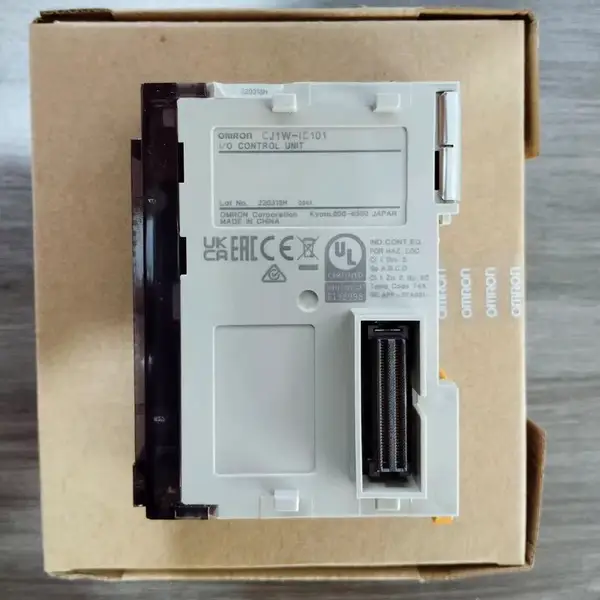
Omron CJ1W-IC101 — I/O Control Unit, CJ Expansion Rack
SKU: CJ1W-IC101USD 35.00
CJ-series I/O Control Unit for CPU rack, required to connect up to 3 expansion racks. Mounts immediately right of CPU
1-Year Warranty
Full manufacturer warranty
Global Shipping
Worldwide delivery available
Genuine Omron
100% authentic product
Ready to Ship
Usually ships within 24h
In Stock
This item is available for immediate shipment from our warehouse.
Contact for pricing, bulk discounts, and shipping
Product Overview
The Omron CJ1W-IC101 is the I/O Control Unit for Omron's CJ-series PLC family — the small module that sits immediately to the right of the CPU on the CPU rack and generates the I/O expansion bus signal that travels out to up to three expansion racks via the I/O Connecting Cables. manufactured by Omron Corporation. Hengyixin Automation stocks this controller in Xiamen and ships within 3-5 business days to most Asian, European, and North American ports.
Without a CJ1W-IC101 installed, the CJ1 / CJ2 / NJ-series CPU cannot see any I/O units mounted on a CJ1W-II101-terminated expansion rack. The module is 20 mm wide (about half the width of a standard CJ1W I/O module), weighs 70 g, draws 0.02 A from the 5 VDC backplane, and has no DIP switches or settings — it is purely a passive bus-driver module, plug-and-connect.
For the CJ2H-CPU6[] (high-performance CJ2 family), the IC101 is also required for CJ1W expansion rack support.
Key Features
- Slim 20 mm wide body
- 5 VDC backplane current consumption 0.02 A
- Required when connecting one or more CJ1W expansion racks
- Connects to CJ1W-II101 on expansion rack via CS1W-CN@@3 I/O Connecting Cable
- SKU: CJ1W-IC101
- Series: CJ-series I/O Control / Interface
Best-Fit Applications
- Migration of an existing CS1W expansion rack design to a CJ2M-CPU33 — replace the CS1W-IC101 with CJ1W-IC101
- CJ2M-CPU33 system with two CJ1W expansion racks for a 4-axis servo machine — IC101 on CPU rack, II101 on each.
- NJ101-1000 controller adding CJ1W-ID211 input modules on a remote expansion rack — IC101 on the CPU side, II101 on the.
Buying Checklist
- Pick CS1W-CN313 for 0.3 m cable
- Pick CS1W-CN713 for 0.7 m cable
- Pick CS1W-CN223 for 2 m cable
Technical Specifications
| Model | CJ1W-IC101 |
|---|---|
| Series | CJ-series I/O Control / Interface |
| Type | I/O Control Unit for CPU rack |
| Mounting Position | Immediately to the right of the CPU unit (mandatory) |
| Number per System | 1 maximum (one per CPU rack) |
| Connected Unit | CJ1W-II101 on each expansion rack (via CS1W-CN@@3 cable) |
| Maximum Expansion Racks | 3 (CJ1M / CJ2M / CJ2H / NJ series); 2 (CJ1G-CPU42H/43H legacy) |
| Total Cable Length Limit | 12 m maximum across all racks |
| Connector Type | 40-pin high-density connector on front face |
| Current Consumption (5 V) | 0.02 A |
| Current Consumption (24 V) | 0 A (no 24 V consumption) |
| Operating Temperature | 0 to +55 °C |
| Storage Temperature | -20 to +75 °C |
| Certifications | UL (UC1), CSA (N), Lloyd's (L), CE |
Manufacturer documentation
Omron's own product page, where the manufacturer's current specification and lifecycle information are published. We are an independent distributor and cannot mirror those documents; the link goes to Omron's site.
FAQ for CJ1W-IC101
Does my CJ2M-CPU33 need a CJ1W-IC101?
Only if you are connecting one or more CJ1W expansion racks. The CJ2M-CPU33 (and the entire CJ2M family) supports up to 3 expansion racks via the CJ1W-IC101 + CJ1W-II101 pair — but the IC101 is not required if your entire I/O system fits on the CPU rack (up to 10 CJ1W modules per rack). For new compact designs where the entire I/O fits on the CPU rack, skip the IC101 entirely.
What's the maximum distance between the CPU rack and the last expansion rack?
12 metres total cable length across all expansion racks (CPU rack → expansion rack 1 → expansion rack 2 → expansion rack 3). This is not a per-cable limit — it is the cumulative length of all CS1W-CN@@3 cables in the system.
Is the CJ1W-IC101 compatible with CS1W expansion racks?
No — the CJ1W-IC101 only works with CJ-series CPUs (CJ1M, CJ2M, CJ2H, NJ-series with CJ1W expansion) and CJ1W expansion racks. For CS1-series CPUs (CS1G, CS1H, CS1D), you must use the CS1W-IC101 instead. The two modules look similar but have different connectors and different firmware revisions. They are NOT interchangeable: a CS1W-IC101 plugged into a CJ2M rack will not work, and a CJ1W-IC101 plugged into a CS1G rack will not work.
Can I use the CJ1W-IC101 with the NJ-series Machine Controllers?
Yes — the CJ1W-IC101 is the recommended I/O Control Unit when adding CJ1W expansion racks to an NJ-series machine controller (NJ101-1000, NJ101-9000, NJ301-1200, NJ501-1300/1400/1500). The NJ-series natively uses NX-series EtherCAT slaves for distributed I/O, but if you have an existing fleet of CJ1W basic I/O units (CJ1W-ID211, CJ1W-OC211, CJ1W-AD081-V1, etc.), the IC101 + II101 pair lets you reuse that I/O on an NJ-series controller. The NJ CPU rack and CJ1W expansion racks communicate via the same CS1W-CN@@3 cables.
Similar Products
Explore related Omron models often viewed alongside this product.