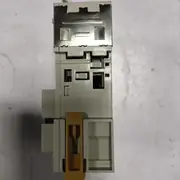
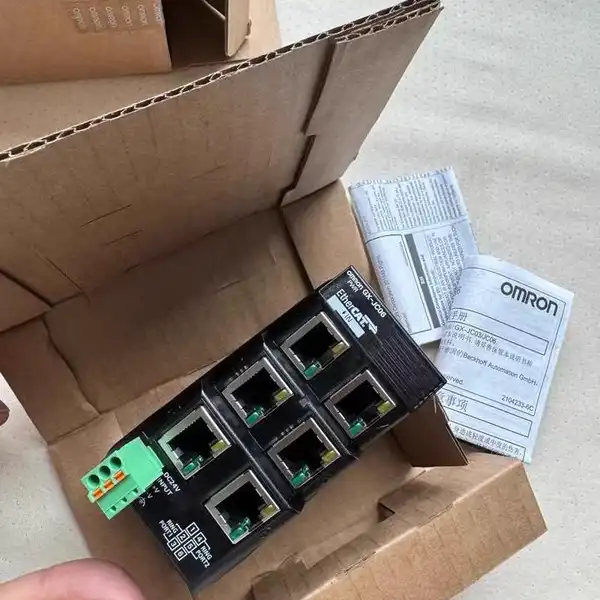
Omron GX-JC06 — 6-Port EtherCAT Junction Slave
SKU: GX-JC06USD 160.00
6-port EtherCAT junction slave (1 input + 5 output star), 24 VDC, 170 mA, IP20. In stock.
1-Year Warranty
Full manufacturer warranty
Global Shipping
Worldwide delivery available
Genuine Omron
100% authentic product
Ready to Ship
Usually ships within 24h
In Stock
This item is available for immediate shipment from our warehouse.
Contact for pricing, bulk discounts, and shipping
Product Overview
The Omron GX-JC06 is a 6-port EtherCAT junction slave from the GX-series It is manufactured by Omron Corporation. Hengyixin Automation stocks this controller in Xiamen and ships within 3-5 business days to most Asian, European, and North American ports.
The unit has one EtherCAT input port and five output ports arranged as a star. Drop it on the EtherCAT trunk to split a single cable run into up to five drops, eliminating external switches and reducing the wiring overhead in large cells.
The body is intended to mount on a 35 mm DIN rail inside the control cabinet. Key specs: Function 6-port EtherCAT junction slave (1 input + 5 output star); Port Count 6 ports total (1 in, 5 out); Power Supply Voltage 24 VDC, 20.4 to 28.8 VDC allowable; Current Consumption 170 mA at 24 VDC; Communication EtherCAT slave; Mounting DIN rail, 35 mm track; Protection IP20; Operating Temperature -10 to +55 degC, 25 to 85% RH non-condensing.
Key Features
- 6-port EtherCAT junction slave, 1 input + 5 output star
- 24 VDC supply, 20.4 to 28.8 VDC allowable, 170 mA consumption
- 48 x 78 x 90 mm DIN-rail body, 220 g, IP20
- Operating -10 to +55 degC, cULus / CE / RCM / KC approvals
- SKU: GX-JC06
- Series: Omron GX-series EtherCAT junction slave
- Voltage: 24 VDC
Best-Fit Applications
- Star split on a packaging line where one EtherCAT run from the NJ controller fans out to five remote I/O drops
- T-branch shortcut on a long conveyor where the trunk cable would otherwise exceed the 100 m EtherCAT distance limit
- Spare drop-in on a GX-series cabinet where the original junction failed and the new GX-JC06 takes the same EtherCAT cables
Buying Checklist
- Pick the GX-JC06 for a 6-port EtherCAT star junction slave on a DIN rail with one input and five outputs.
- Pick the GX-JC03 instead when the cabinet only needs a 3-port T-branch on the same EtherCAT trunk.
- Pick the NX-ECC201 instead when the application needs a 3-port EtherCAT coupler between two NX I/O drops.
Technical Specifications
| Manufacturer | Omron Corporation (Japan) |
|---|---|
| Series | Omron GX-series EtherCAT junction slave |
| Model / SKU | GX-JC06 |
| Function | 6-port EtherCAT junction slave (1 input + 5 output star) |
| Port Count | 6 ports total (1 in, 5 out) |
| Power Supply Voltage | 24 VDC, 20.4 to 28.8 VDC allowable |
| Current Consumption | 170 mA at 24 VDC |
| Communication | EtherCAT slave |
| Mounting | DIN rail, 35 mm track |
| Protection | IP20 |
| Operating Temperature | -10 to +55 degC, 25 to 85% RH non-condensing |
| Dimensions / Weight | 48 (H) x 78 (W) x 90 (D) mm; 220 g |
FAQ for GX-JC06
Is the GX-JC06 an Ethernet switch?
No. It is an EtherCAT junction slave, not a general Ethernet switch. It only passes EtherCAT telegrams with the small propagation delay EtherCAT requires. It cannot be used to connect Profinet, EtherNet/IP or standard TCP/IP nodes.
How many drops can I run from one GX-JC06?
Up to five EtherCAT drops, each on its own branch. The cable between the master and the GX-JC06 still follows the standard 100 m EtherCAT distance rule, and the same 100 m rule applies to each branch off the junction.
Does the GX-JC06 add any cycle time?
Yes, but very little. The junction adds a few hundred nanoseconds of propagation delay per port. For a 1 ms EtherCAT cycle that is negligible. For a 125 us cycle, plan the trunk topology carefully.
Does the GX-JC06 need a separate power supply?
Yes. The unit pulls 170 mA from an external 24 VDC supply (not from the EtherCAT cable). The supply terminal is on the front of the unit, next to the status LED.
What status LEDs does the GX-JC06 show?
One green link / activity LED per port, plus a single green power LED on the front. When all ports are linked and the supply is healthy, all six LEDs are lit. A blinking port LED usually means a bad cable or a reversed pair.
Similar Products
Explore related Omron models often viewed alongside this product.